
OneBrowser Malware
This is a story of the OneBrowser malware, how I found it, and some information about the report and analysis I have on GitHub.
MALWARE
CyberPanther232
7/15/20266 min read
Introduction
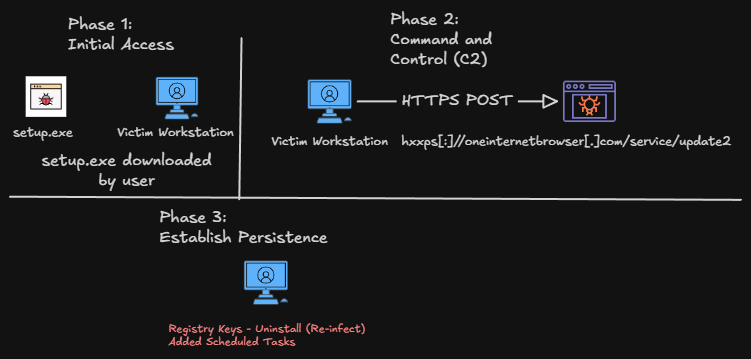
Below, I have listed what I believe are the phases of a piece of malicious software I found on a family member's workstation. This malware is a devious application that poses as a legitimate Chromium-based browser. The characteristics of this malware are quiet and hidden from the user's perspective, but loud when viewed in network traffic. This blog will discuss how I came across this malware sample, how I resolved it, and tips for preventing it in the future. For those more interested in the technical analysis, I have the full write-up and report on the GitHub link at the bottom of this blog post.
Discovery
A few weeks ago, a family member approached me after noticing strange activity on their laptop. When they opened their browser, two tabs appeared with auto-filled links that led to two suspicious search engines. Because this behavior was unexpected, they tried to manually remove the software and browser settings that had changed. That seemed to work at first, but after a reboot or power cycle, the same behavior returned. They then reached out to me and asked if I could take a look at the device.
Once I had access to the laptop, I opened the browser to confirm whether the anomalous behavior was still occurring. The activity matched the description exactly: two tabs opened and directed me to two suspicious sites. After visiting them, I copied the links into VirusTotal to see whether they had been flagged previously. Multiple security vendors classified the URLs as malicious, giving me high confidence that malicious software was on the machine. After hearing the family member explain the behavior and persistence of this malware, I downloaded the Sysinternals Suite and ran "autoruns.exe" to check for programs running at startup. I found a scheduled task titled "OneBrowser" and registry keys in the "OB" folder. Once I identified these persistence methods, I was led down a rabbit hole trying to discover how deeply this malware had infected this machine.
Investigation and Analysis
I began investigating the working directory of the malicious executables I found on this machine. I found three separate executables that stood out.
setup.exe
OneBrowser.exe
OBUpdateService.exe
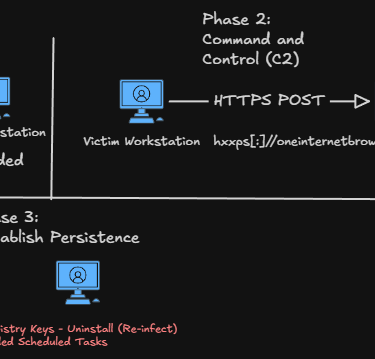
The setup.exe was mentioned within the registry keys, and the OBUpdateService.exe was a part of the "Actions" within the scheduled tasks. I found that all of the executables and artifacts were in the directory "C:\Program Files (x86)\OB". This is where the malware called home and mainly ran its malicious operations from. It was disguising itself as a legitimate application. Upon further investigation, I found that it was not the root cause or origin of the suspicious browser activity that started the investigation in the first place. The malware was stealthy compared to other viruses that I would later find thriving on this machine. Unlike others, it was silently stealing information from the workstation. I found this through dynamic analysis with the RecordedFuture "Tria.ge" sandbox. Once the setup.exe is started, the application immediately starts beaconing out to the URL found in the image below. Doing some heuristic-based (behavior) analysis on the payload sent to the URL, I believe this is a beacon to notify the developer or malicious actor of a successful connection and execution of the initial malware payload. Basically, the malware was sending a message to its master stating "We've got em!" Once the connection is established, additional payloads are created and downloaded onto the machine. Spreading the infection and establishing methods of persistence. Below is a diagram of the phases this malware took as per my analysis.
While I believe I identified all of the persistence and activities of the malware, because of how extensive this malicious software package is, I may have missed some additional artifacts. From there, I pivoted from analyzing the behavior of the executables to the behavior of the website.
The website hosts a modern theme with the words "One Browser". This website appears to be a front for the malicious software. My initial thoughts were that this site hosted the malicious payload. However, I was unable to download anything from it. Since the initial applications were compiled in 2025, I believe the source of the download may have changed over time. Below is a screenshot of the site for reference.
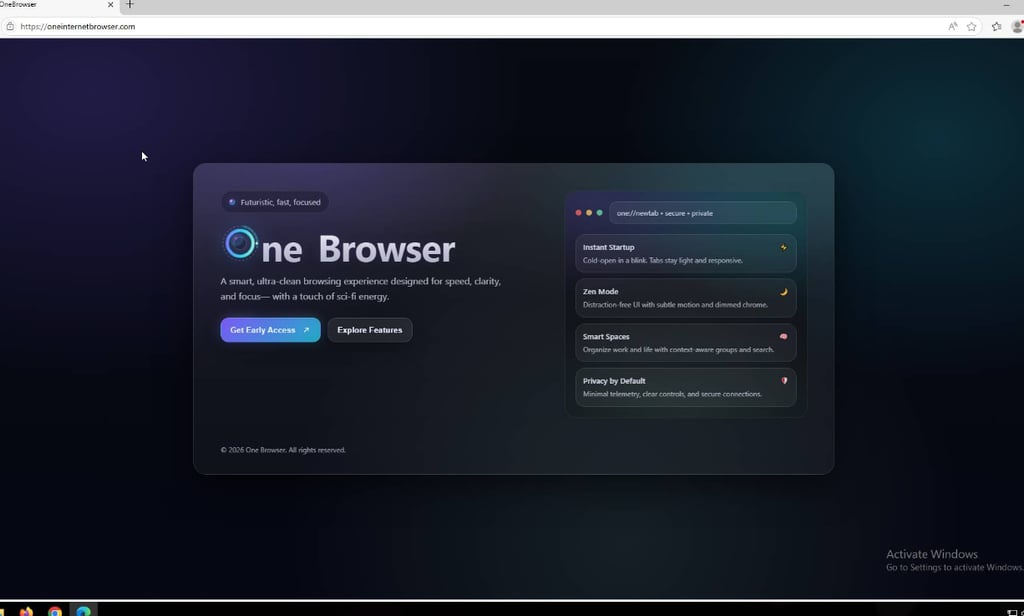
After identifying the behavior and reputation of the URL and applications, I was fully confident that this application was malicious and it needed to be removed immediately from the workstation.
Containment and Eradication
Once I validated the malicious intent behind the applications and website, I immediately began deleting the scheduled task and artifacts on the machine. I did this hastily as it was nearing the execution trigger for the task. This led to me not being able to extract and analyze the OBUpdateService.exe program. After realizing this mistake, I immediately grabbed the entire OB directory and archived it using 7zip and password-protected it for safety during transmission. That way, I could conduct further static and dynamic analysis after cleaning and eradicating the malicious code. I then proceeded to delete the OB directory and remove it from the recycling bin. Once I removed that folder, I sent the password-protected archive to one of my machines for further analysis. All of the executables had been removed from the machine. The snake was defanged. Now I had to kill it and clean up the remains.
Since the registry key changes were extensive, I turned to a tool I heard about from other cybersecurity influencers. "Revo Uninstaller" is the tool that ensures that when you uninstall programs, all of their leftovers are discarded. I have put a link to it below (I promise I am not sponsored by them). This free tool identified the remnants of the malicious program and then proceeded to remove all of them. Now that the machine is contained and the threat has been eradicated, it is time to talk about awareness and prevention.
Awareness and Prevention
This type of malicious software can be downloaded by anyone, and because of how stealthy it is, it is almost impossible to identify if you don't understand what to look for and where. The malware is classified as a "Potentially Unwanted Application (PUA) or Spyware". These classifications indicate that this application hides its true intentions. Deception is its number one asset, leading to infections that can go completely unnoticed. However, no matter how stealthy or deceptive, with the proper awareness, you can reduce the likelihood of installing this type of application on your machine.
Here's my guide to avoiding downloading weird applications:
Check the website's reputation (using VirusTotal) or online sources such as Reddit, Google, etc.
If it's free, you're paying with something else - Do not download if you do not know what you're paying with.
When in doubt, just don't download it. Trust your gut. If it feels sketchy, it's probably sketchy.
There's no exact science when identifying malicious intent or behavior. So, ultimately, just trust your gut and go with what you think is right. Most of the time, free software is free for a reason. It is either harvesting your personal data or malware from the start. I know subscription-based services are expensive, but typically those are developed by accredited and valid organizations. Also, I would recommend some antivirus solutions other than Windows Defender. While Windows Defender has come a long way and is consistently adding detections for new malware, it still did not identify the malicious nature of this software. Downloading other tools, such as MalwareBytes, is a tool that will add additional protections and make your device just a bit safer.
Conclusion
The internet is a cool and awesome place that enhances our daily lives. However, just like the real world, it has dangerous places too that are trying to take advantage of those who aren't armed with the knowledge and expertise of technology. If you take anything away from this blog, please let it be this. Things are not always what they appear to be. Always verify the source of what you download. Stay aware of trends and scams that occur on the internet.
Stay safe, stay curious, and take your privacy and security seriously.
- CyberPanther232
Resources:
OneBrowser Malware Write-Up - https://github.com/CyberPanther232/Malware-Analysis/blob/master/OneBrowser/OneBrowser%20Malware%20Write-Up.md
OneBrowser Malware Analysis Report - https://github.com/CyberPanther232/Malware-Analysis/blob/master/OneBrowser/OneBrowser%20Malware%20Analysis.md
Malware Analysis GitHub Repository - https://github.com/CyberPanther232/Malware-Analysis
Revo Uninstaller Tool - https://www.revouninstaller.com/revo-uninstaller-free-download/
Sysinternals Suite - https://learn.microsoft.com/en-us/sysinternals/